Prove
Prove is where delivery gets proven, not just planned: the monthly status report, the board pack, and the acceptance chain that says a deliverable is actually done. This is where a finance person, a delivery lead writing a report, a board reader taking something to a board, and a customer accepting a deliverable each spend their time.
Writing the monthly report
Section titled “Writing the monthly report”Prove → Write month lists every in-scope work package for the period, each with a system-proposed verdict, not a blank colour picker. The proposal is built entirely from the same live status your work packages already show elsewhere in the product, with the actual reasons behind it and a link to fix each one at source. If the proposal looks wrong, the intended fix is to correct the thing that’s actually wrong (a stale date, a step nobody’s updated), following the link takes you straight into Deliver, and the proposal updates live once you’ve fixed it, without losing anything you’d already typed here.
For each work package you either:
- Confirm the proposed reading, or
- Override it, picking Green, Amber or Red yourself and giving a required reason, “once, for this work package this month,” not per field.
Both readings are kept, forever, once you publish. A published report always shows what the system proposed and what you actually said, side by side if they differ, with your reason. Nothing about the system’s own reading is ever edited to match your override. If you’ve overridden the same work package’s reading three months running, the report tells you so plainly, it’s flagged, not hidden.
Once a period is published, it’s locked: publishing the same work package for the same period again is refused.
Reading the month, and the board pack
Section titled “Reading the month, and the board pack”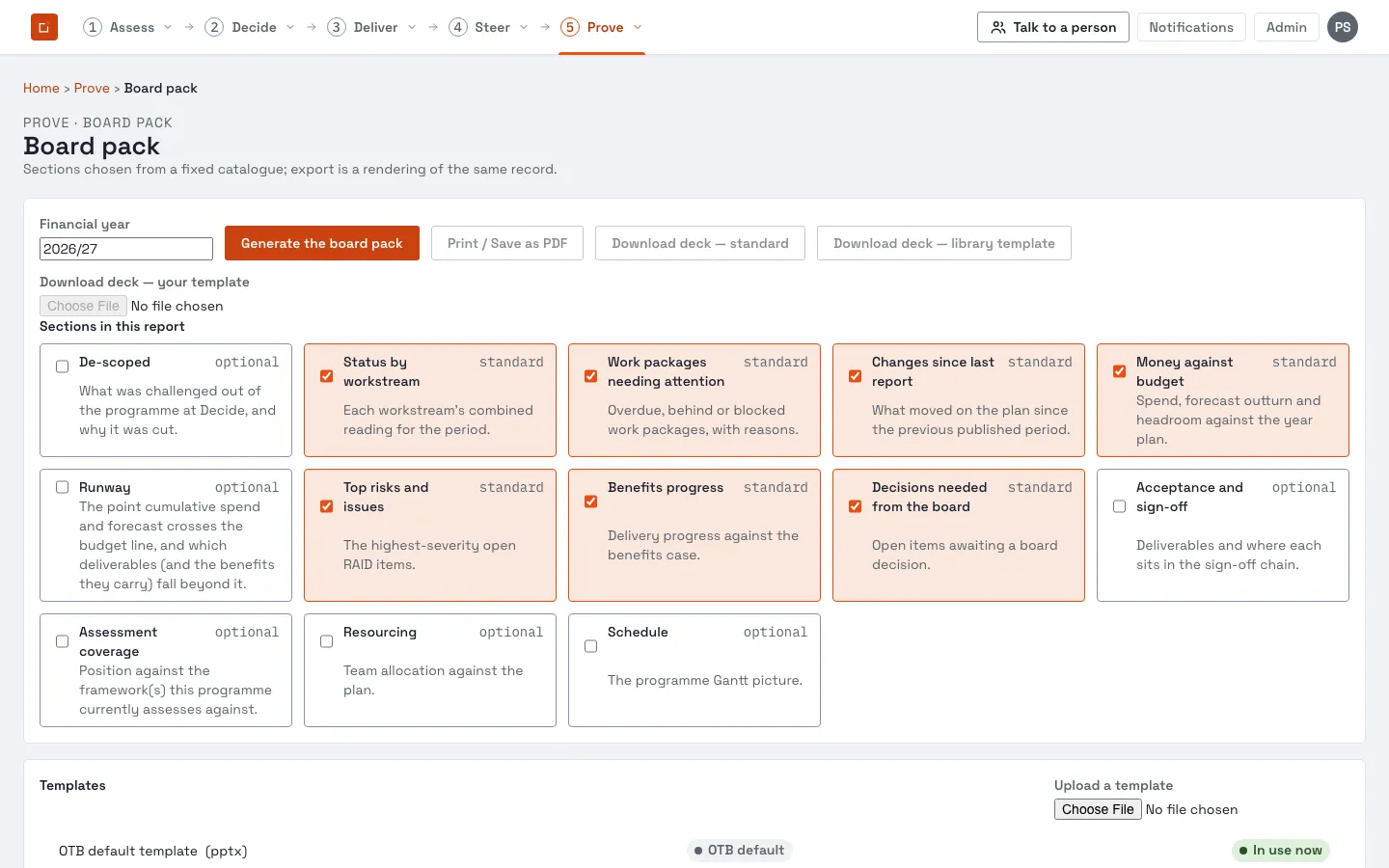
Prove → Read month and Prove → Board pack are how a published record gets looked at afterwards, or taken somewhere else entirely.
A board pack is a rendering of an already-published record, never a fresh recalculation. Whatever it says is exactly what stood at the moment it was generated, later changes to thresholds, labels or the live plan never rewrite a pack that already exists. It can be exported as PDF or as PowerPoint; an instance can also bind a pack to its own PowerPoint template (an administrator sets this up) so a customer’s own house style is used automatically.
Money is never shown to someone who doesn’t hold cost visibility, not as a number, not as a redacted placeholder. If you open a board pack without holding cost visibility, the money-carrying parts of the pack aren’t rendered as blanked-out figures; you’re told plainly you don’t hold cost visibility, and nothing with a “£” in it appears anywhere on the page. See reach for why cost visibility is always a separate grant from seeing the plan itself.
Acceptance, proving a deliverable is actually done
Section titled “Acceptance, proving a deliverable is actually done”Prove → Acceptance lists deliverables and their sign-off progress; opening one shows its own chain in full. Read the acceptance and approval chains first for how the chain itself works, this section covers using it day to day.
Nothing can be signed until a deliverable has a definition of done written against it. Once it does, the page shows a track of every stage: which are signed (by whom, when), which stage is next and who’s currently eligible to sign it, and anything not yet reached.
If you did the work, you can’t sign it off. This is checked and shown directly , the page tells you plainly why you don’t have a Sign button, rather than just hiding it with no explanation. An administrator can turn this rule off for a specific stage on a specific instance, but the default everywhere is that the person who did the work is not the person who accepts it.
Once every required stage has a current, non-stale signature, the deliverable reads as fully accepted, and only from that point does any benefit it feeds count as able to reach fully realised.
A note on delegated signing: the domain design documents a specific mechanism for one person signing “on behalf of” another (shown as, for example, “Grace signed on behalf of James,” never collapsed to just one name), with the same segregation-of-duties check applied to both names. This is a genuinely designed part of the product, but at the time of writing it has no automated test proving it behaves this way end to end in a running instance, treat the exact on-screen wording and behaviour as not independently verified, and confirm it directly against your own instance before relying on it for something that matters.
Where to go next
Section titled “Where to go next”- The acceptance and approval chains and reach, the concepts behind everything on this page.
- The Deliver section, for where the underlying status and dates a monthly report proposes from actually come from.
- The Steer section, for the dashboards that read the same live status outside of a monthly cycle.
- The administrator guide for configuring the sign-off chain itself, and the licence page for what a board pack export requires.