Comparing assessments
Who this is for. A programme manager or Assessor who has assessed a framework more than once, or in more than one part of the organisation, and needs to say whether things got better.
Where you are standing. In Assess, with at least two assessments on the same framework and the same scope.
What you arrived wanting. A figure and a section-by-section view that show the direction, and an honest account of what that figure covers.
What done looks like. You can state how many outcomes are achieved now, how that compares with the last assessment and with the first, and you know what the screen refuses to compare.
Scopes
Section titled “Scopes”An assessment covers a scope: the whole organisation, or a part of it such as a business unit. Each scope holds its own current assessment of a framework, so two business units can each keep a baselined assessment of the same framework at the same time.
Baselining an assessment replaces only the current assessment of the same framework and the same scope. It does not touch another scope’s.
- You choose the scope when you start an assessment, from Scope. The first option is Whole organisation; A new scope… creates one by name.
- On Where we stand, the Scopes card lists the scopes. Each can be renamed and deleted, and Who can read sets its readers.
- Assessments that existed before 1.0.5 read as the whole organisation. The free-text Business units field on an assessment became scopes when you upgraded: each value you had entered is now a scope. Check Where we stand to confirm the scopes you expect.
Who can read a scope
Section titled “Who can read a scope”A scope is read by the people listed on it and by every role that holds Assessments: Edit (Admin and Assessor by default). Everyone else does not see the scope in lists, totals, the Advisor or live updates, and a board pack shows “An assessment you cannot see” in its place. A role that holds only Assessments: View, such as Auditor and Board Reader, must be listed on a restricted scope to read it.
What counts as achieved
Section titled “What counts as achieved”An outcome is a scored leaf of the framework. It is achieved when its score reaches the framework’s achieved target. You set it on the framework’s page under What counts as achieved, An outcome is achieved at or above. Until you set it, the target is the top of the scale, so no figure changes on upgrade.
On a four-band scale where the top band is “Achieved”, leave it alone. On a maturity scale where 3 is the aim, set it to 3.
Where we stand
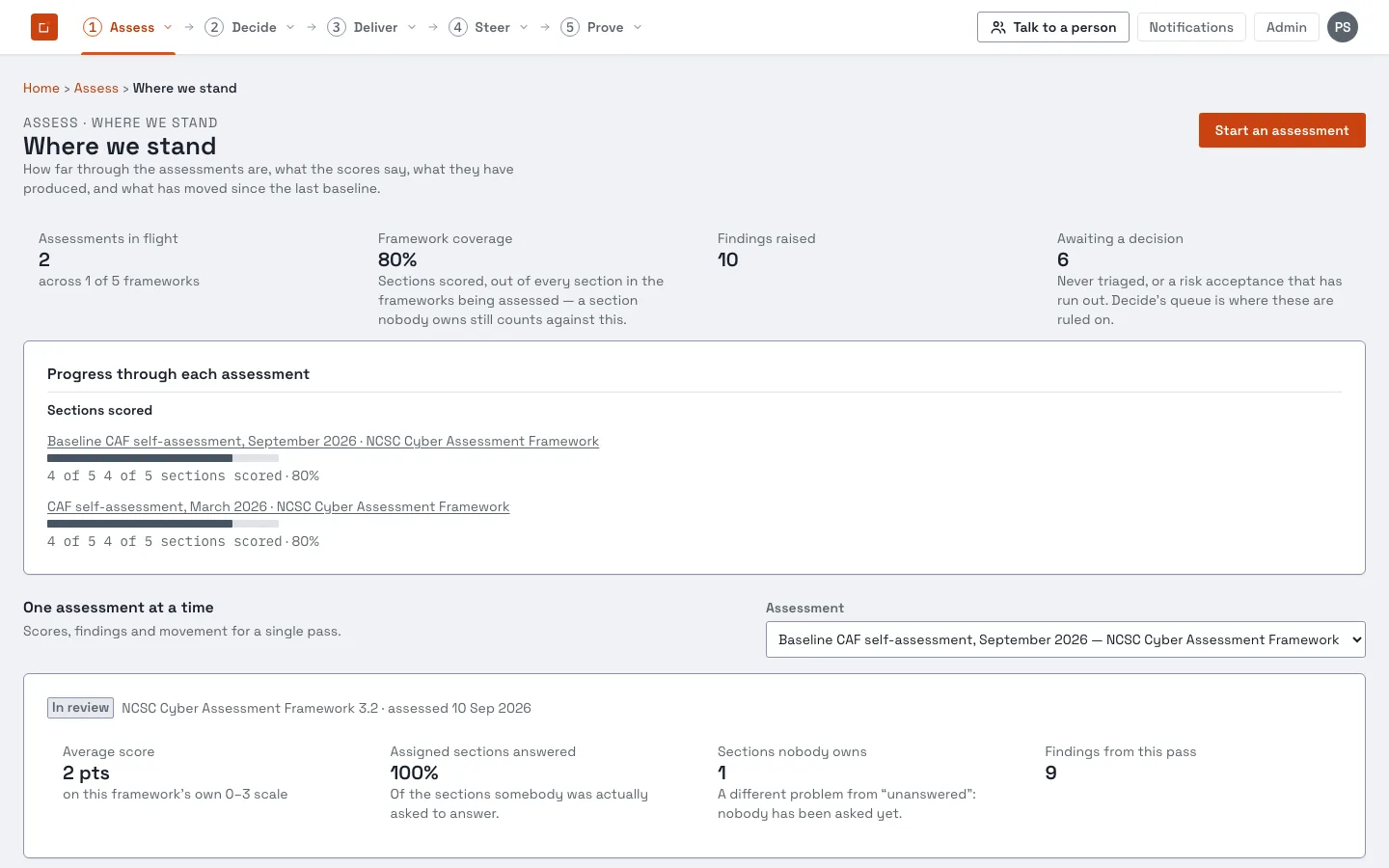
Section titled “Where we stand”Assess, then Where we stand, is the opening screen of the stage. It needs the Assess view or edit permission. It answers four questions, in order.
| Question | What it shows |
|---|---|
| How far through are we? | Assessments in flight; framework coverage (sections scored out of every section in the frameworks being assessed, so a section nobody owns counts against it); findings raised; findings awaiting a decision. |
| What do the scores say? | Sections at each band of the framework’s own scale, for one assessment. |
| What did it produce? | Findings by severity, split between awaiting a decision and ruled on. |
| Has it got better? | What has moved, described below. |
Superseded assessments are left out of the overview. They remain what a current assessment is measured against.
What has moved
Section titled “What has moved”For the assessment you choose under One assessment at a time, the card compares it with the most recent baselined assessment of the same framework and the same scope that is not later than it. A draft that someone is still filling in is not used, because the figure would change as they typed.
| Tile | Meaning |
|---|---|
| Improved | Outcomes scored in both assessments with a higher score now. |
| Declined | Outcomes scored in both with a lower score now. |
| Unchanged | Outcomes scored in both with the same score. |
| Average movement | The mean change across the outcomes scored in both, as a share of the framework’s own scale, so a four-point scale and a six-point scale can be read together. |
The chart shows each outcome scored in both passes as a before and after pair. If there is nothing to compare with, the card says so and explains that movement needs two passes over the same scope: baseline this one, and the next pass will measure against it.
The Movement page
Section titled “The Movement page”Open an assessment, then select its movement link. The page shows the same four tiles, a chart, and a Node by node tree.
Compare against lists every other assessment of the same framework and scope dated on or before this one. It starts on the most recent baselined one. Drafts and assessments in review are in the list, marked “(draft, not baselined)”, and are compared only when you choose one; the page then warns that its scores can still change.
Across framework versions
Section titled “Across framework versions”Movement compares only assessments of one framework version. Each version of a framework is its own framework, so its sections do not match the older version’s, and Works has no mapping between versions.
If you ask for a comparison across versions, Works refuses it in words: “These assessments use different frameworks (CAF 4.0 and CAF 3.2); there is no mapping between them. Compare against an assessment on the same framework version; a mapping between versions would allow this and has not been set up.” There is no figure and no guess. After a framework update the first assessment on the new version has nothing to move from; the second one has.
Comparing scopes in the board pack
Section titled “Comparing scopes in the board pack”Two optional sections of the board pack carry the comparison between scopes. Add them where the pack’s sections are chosen (see customising reports).
- Assessment movement. For each scope, how many outcomes are achieved now, at the previous assessment and at baseline, out of the framework’s outcomes: for example, “14 of 39 outcomes achieved, from 9 at baseline”. With no previous assessment the section says why rather than showing zero.
- Compliance across scopes. A heat map for each framework: a row for each scope, a column for each objective of the framework, read from each scope’s current baselined assessment. A cell is the average of the outcomes beneath the column, moved to the nearest point of the framework’s scale, and is coloured only when every outcome beneath it is scored; otherwise it reads “Not fully scored (n of m)”. A scope with no baselined assessment reads “Not assessed” and is not coloured.
A reader who may not read a scope sees one neutral line in place of it, and no scope name, framework or count. Both sections are frozen with the pack when it is generated.
Accepted delivery work can be shown beside these figures as a projection; see how delivered work shows in compliance. A projection is never counted in an achieved figure, in movement or in the heat map.
How the figure is worked out
Section titled “How the figure is worked out”Each outcome is matched by its place in the framework. For each outcome scored in either assessment:
- Improved, declined, unchanged. Scored in both; the sign of the difference.
- New. Scored now, not before.
- No longer scored. Scored before, not now. This does not mean the section was removed from the framework; it was not re-scored.
The average is taken only across outcomes scored in both. If there are none, the tile is empty rather than zero.
Limits
Section titled “Limits”- Same framework version and same scope only. Across versions the comparison is refused, not mapped.
- Scores are not weighted. The average treats every outcome scored in both passes equally.
- The heat map is on the board pack only. Where we stand has no all-scopes view.
- Findings follow the assessment’s readers. Every findings screen and read (list, detail, Addressed by, business case) answers “not found” for a finding in an assessment the person may not read.